
NEWS
Windows 11 Names User Folders Only on New Setups
Windows 11 lets you name the user folder during setup after the June 2026 update, but existing PCs still cannot rename C:\Users.

Windows 11 now lets you type a custom user folder name during setup, but only on a new or reset PC. The field landed in the May 26, 2026 optional update KB5089573, then rode into the June 9, 2026 security update for versions 24H2 and 25H2. Machines that already finished setup keep the old path under C:\Users, often the first five letters of a Microsoft account email.
Microsoft still has no supported button to rename that folder in place.
A Folder Name Field on the Device Page
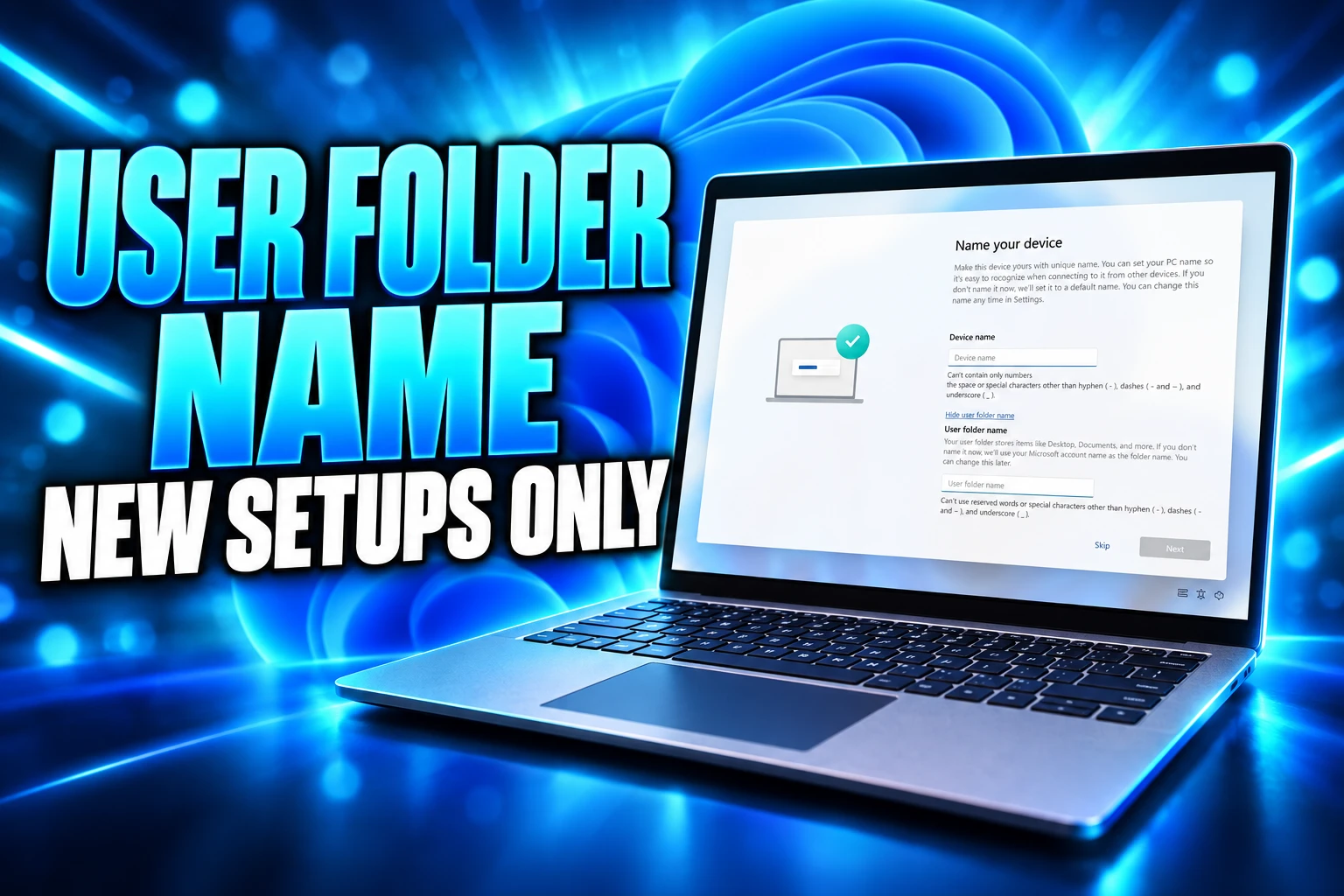
The new control sits on the Device Name page in out-of-box setup, the screens that run when you turn on a new PC or wipe one. Microsoft’s May preview notes say you can choose a custom name for your user folder there, and only there. Skip the step and Windows keeps the generated name and continues.
KB5089573 moved Windows 11 24H2 and 25H2 to OS builds 26100.8524 and 26200.8524. It was an optional preview, listed under Windows Update’s optional updates. The June security package, KB5094126, then took those machines to 26100.8655 and 26200.8655 and folded in the May preview’s non-security work, including this setup change.
The Device Name page itself is older. Windows 11 already let you name the PC during setup, and you can still rename the computer later in Settings. The profile folder under C:\Users is different. That directory holds Documents, Downloads, the desktop, AppData, and most of what a signed-in account touches, so Windows treats the name as part of the profile, not as a label you can edit on a whim.
You can now choose a custom name for your user folder on the Device Name page during Windows setup. The updated experience makes it easier to select a custom name during setup only. If this step is skipped, Windows uses the default folder name and continues setup as usual.
Microsoft, KB5089573 Windows 11 preview notes
Microsoft’s own screenshots show a collapsed Device Name page and an expanded state with a user folder box under the PC name. The Windows Insider Program Team put that UI into Dev Channel Build 26300.8068 (KB 5079464) on March 13, 2026, after a command-line helper had already been rolling to Insiders. A matching Beta Channel build, 26220.8062, carried the same setup change.
THE ROAD TO THE DEVICE NAME BOX
- October 6, 2025: Adds SetDefaultUserFolder.cmd in Dev Channel Build 26220.6772 (KB5065797), run from the Microsoft account sign-in page.
- March 13, 2026: Puts a user folder name box on the Device Name page in Build 26300.8068.
- May 26, 2026: Ships the field in optional preview KB5089573 for Windows 11 24H2 and 25H2.
- June 9, 2026: Pulls that preview into mandatory KB5094126, OS builds 26100.8655 and 26200.8655.
Code on an already-running PC does not reopen setup. Installing June’s update on a machine that finished OOBE months ago leaves C:\Users alone. The field matters when setup runs again, on new hardware, a Reset this PC wipe, or a fresh install from updated media.
Windows Took the First Five Letters of Your Email
Sign in with a Microsoft account during setup, and Windows has long built the profile folder from the email, not from the name you use in Settings. The stub is the first five letters of that address. An account that starts with abhijith becomes C:\Users\abhij. A six-letter first name still loses the last letter. Numbers or symbols near the front of an address end up in the path too.
Zac Bowden wrote on X that the Microsoft account path is a bad way to name a home directory, because “it uses the first 5 letters of your email address, not your first name.” That is the folder you see in File Explorer, in Terminal, and in every tool that expands %USERPROFILE%.
The habit is older than Windows 11. By 2016, Windows 10 was already documenting the same five-character Microsoft account folder, so a decade of PCs shipped with truncated paths. Local accounts escaped it, because the folder took the account name you typed. Microsoft account setup did not offer that choice, and Windows 11 made that sign-in the default road through OOBE.
Ugly names are the part everyone notices. The part that breaks work is the path itself. Build scripts, old environment variables, game mods, and tools that hard-code C:\Users\alex fail when the real folder is C:\Users\alexc or C:\Users\john1. You can rewrite every path. You cannot make Windows treat a renamed folder as the same profile without touching the registry, which is why this sat in Feedback Hub for so long.
Why Existing User Folders Still Cannot Be Renamed
The Device Name field never runs again after you leave setup, so a PC that already has a profile cannot use it. Microsoft says that if you skip the step, Windows uses the default folder name and continues. There is no later Settings page that reopens the choice. For a folder already named from an email, the supported clean path is still a new account or a full reset.
That is the joke hiding in the release notes. The people who filed the Feedback Hub requests are the ones who already live with C:\Users\abhij. The May and June updates do not edit that directory. They only change what happens the next time Windows creates a profile.
WAYS TO GET A CLEAN C:\USERS FOLDER
| Method | What you get | What it costs |
|---|---|---|
| New PC, fresh install, or Reset this PC | The Device Name field, if updated setup is present | A wipe of the current Windows install |
| New local administrator | A folder named after the new account | A file-and-app move, then deletion of the old profile |
| ProfileImagePath plus a folder rename | The same account pointed at a new path | An unsupported registry edit that can break apps |
The migrate path is the one technicians actually use. You add a local admin whose name is the folder you want, copy data out of the old profile, switch Microsoft account sign-in onto the new user, and delete the stub account. It works because Windows creates the folder at account creation, which is the same moment the new setup field now intercepts.
The registry path is HKEY_LOCAL_MACHINE\SOFTWARE\Microsoft\Windows NT\CurrentVersion\ProfileList, where each SID stores ProfileImagePath. People change that string, rename the folder under C:\Users to match, and hope shortcuts, Store apps, and encrypted data still resolve. Guides that walk through it also tell you to do the work from a second admin, because you cannot rename a loaded profile. Microsoft does not ship that procedure as a supported tool, and broken app settings after a rename are common enough that most advice is to migrate instead.
Wiping to chase a prettier folder is a heavy move, and it only helps if the setup screens you land on actually show the new box. Microsoft’s May notes split features across a gradual rollout and a normal rollout, so a reset on the day KB5089573 appeared could still miss the field. By the June security update the code is in the cumulative package for 24H2 and 25H2, which is the practical window for anyone who is already planning a clean install.
October’s Insider Build Closed Local Account Shortcuts
The folder field did not arrive alone. On October 6, 2025, in Dev Channel Build 26220.6772, Microsoft documented a helper called SetDefaultUserFolder.cmd and, in the same Windows Setup Experience block, said it was removing known mechanisms for creating a local account during OOBE. Amanda Langowski’s Insider post said those mechanisms skipped critical setup screens. It also said users will need to complete OOBE with internet and a Microsoft account.
We are removing known mechanisms for creating a local account in the Windows Setup experience (OOBE). While these mechanisms were often used to bypass Microsoft account setup, they also inadvertently skip critical setup screens, potentially causing users to exit OOBE with a device that is not fully configured for use.
Amanda Langowski, Windows Insider Blog, October 6, 2025
Power users already had a ritual for a clean folder: finish setup on a local account, delete the Microsoft account profile Windows created first, then link the local user to the Microsoft account. Robert Hendrie described that loop when the Device Name UI was announced. The October build went after the in-setup shortcuts that made a local account easy, then offered a command to name the Microsoft account folder instead.
That command still lives in the OOBE folder. On the Microsoft account sign-in page you can press Shift+F10, run cd oobe, then SetDefaultUserFolder.cmd with a name. Microsoft’s October notes cap that name at 16 characters, accept Unicode, and strip special characters. You still have to proceed with Microsoft account sign-in. If the name is valid, it becomes C:\Users\thatname. If you never run the command and never fill the later Device Name box, Windows generates the folder from the email.
Ali Tajran, a Microsoft MVP, pointed out in late August 2026 that a local account created during setup does not use the new Device Name field. The folder already takes the local account name. The extra box is for the Microsoft account road, which is the road Microsoft wants OOBE to stay on. The louder leftover complaint on X is not the stub folder, it is setup screens that return after updates and an account requirement that still sits in front of the desktop.
How to Set a Custom User Folder During Setup
On a new 24H2 or 25H2 install that includes the May or June bits, the Device Name page is where you name both the PC and, if the box is shown, the user folder. Type the folder name before you finish Microsoft account sign-in. Microsoft’s notes say the option is available during setup only, and that a skipped step keeps the default folder name.
STEPS ON THE DEVICE NAME PAGE
- Reach Device Name: Work through OOBE until the page that asks you to name the PC, which is the same page Microsoft extended.
- Show the folder box: Expand the user folder name control if the page opens in its default collapsed state.
- Type the folder: Enter the name you want under C:\Users, staying inside Windows file name rules.
- Do not skip if you care: Leaving it blank sends you back to the generated email stub for that install.
- Fall back to the command: If the box is missing, Shift+F10 still opens a prompt where SetDefaultUserFolder.cmd can set the name before Microsoft account sign-in finishes.
Computer name and folder name are easy to mix up. You can rename the PC later without touching profiles. The user folder is the profile root, so getting it right is a one-shot during that OOBE session. After you reach the desktop, File Explorer’s C:\Users list is the check. If you see the name you typed, setup took it. If you see five letters from the email, that install is locked into the old scheme unless you migrate or wipe.
Updated installation media and a current cumulative update both matter. Applying KB5094126 to a running PC does not rewrite an existing profile, and an old USB installer can still run an older OOBE even when the finished system would be able to update. Anyone imaging PCs should treat the Device Name field as a setup-media problem, not as a policy they can flip after first boot.
Reserved Names and the Cost of Skipping
Microsoft’s setup notes send the folder name through the same file rules as the rest of Windows. The company links those rules to its standard Windows naming requirements. Spaces and Unicode can work on modern NTFS, but older command-line tools, scripts, and mods still stumble on blanks and symbols, which is why a single word of letters is the boring choice that survives.
WINDOWS FOLDER NAME LIMITS
- Reserved characters: Do not use < >: ” / \ | ? * in the folder name.
- Reserved device names: CON, PRN, AUX, NUL, COM1, and LPT1 are blocked as folder names.
- Trailing junk: A name cannot end with a space or a period.
- Command length: SetDefaultUserFolder.cmd is documented at 16 characters, with special characters stripped.
- Skip behavior: An empty field does not pause setup; Windows writes the default folder and moves on.
Skip the field once and you are in the same place existing users already occupy. Device name can change. The profile folder cannot, short of a new account or a reset. That is why the June update reads larger in a setup lab than on a PC that has been in a backpack since 2024.
A clean install that reaches the Device Name page can store the profile as C:\Users\Alex. A PC that already finished setup will keep loading the truncated folder until someone wipes it or builds a new account and moves the files.
Frequently Asked Questions
Can I Change an Existing Windows 11 User Folder Name?
Microsoft does not ship an in-place rename for a profile that already exists. The practical supported method is a second local administrator named the way you want the folder to appear, a copy of your files, and a switch of Microsoft account sign-in onto that new user. Editing ProfileImagePath and renaming C:\Users from another admin can point the same SID at a new path, but Store apps and saved settings often break, which is why that route stays unofficial.
What Happens if I Skip the User Folder Name During Setup?
Windows writes the generated folder, usually the first five letters of the Microsoft account email, and continues OOBE with no second chance on that install. You can still change the computer name later in Settings. The profile directory stays put, so a skipped Device Name page is equivalent to every Windows 11 PC set up before the field existed.
Does the Custom User Folder Name Work With a Local Account?
No. A local account already names C:\Users after the account name you type, so the Device Name folder box is aimed at Microsoft account setup. Ali Tajran noted that if you create a local account during Windows 11 setup, the new field does not apply. The October 2025 Insider notes also tied SetDefaultUserFolder.cmd to proceeding with Microsoft account sign-in.
Which Windows 11 Versions Include the Device Name Folder Field?
Microsoft’s KB5089573 and KB5094126 notes for this setup change apply to Windows 11 24H2 and 25H2. The June 9, 2026 package is the mandatory train that includes the May preview. Home and Pro editions of 24H2 reach end of updates on October 13, 2026, so a wipe of 24H2 Home just to rename a folder leaves a short remaining support window unless you move to a later Windows 11 release.
Is SetDefaultUserFolder.cmd Still Available After the New Setup Page?
Yes. The helper Microsoft added in Build 26220.6772 still runs from an OOBE command prompt: Shift+F10, cd oobe, then SetDefaultUserFolder.cmd followed by the name. The documented cap is 16 characters, Unicode only, with special characters removed, and the name applies only if you continue through Microsoft account sign-in. Use it when the Device Name box is missing on a given install.

Windows 11 26H2 Turns Settings Backup On by Default

The Gears 2 PC Port Epic Refused to Ship

Ghost Recon Wildlands Returns at 4K as a Catalog Product

Waterpark Simulator Keeps the $12.99 Price After 1.0

Nurix Puts NuPlay on Microsoft Marketplace to Reach Azure Buyers

Warzone Leaves Xbox One and PS4 After Season 06

Microsoft AI Was Set Free to Build Its Own Frontier

Microsoft IQ Turns Workplace Data Into a Metered Agent Brain

Xbox Games Showcase 2026 Split the Catalog in Two

Nadella Banned Addiction Talk While Scout Kept Heartbeat
-
 NEWS4 months ago
Warzone Leaves Xbox One and PS4 After Season 06
-
 NEWS4 months ago
Microsoft AI Was Set Free to Build Its Own Frontier
-
 MICROSOFT 3654 months ago
Microsoft IQ Turns Workplace Data Into a Metered Agent Brain
-
 NEWS4 months ago
Xbox Games Showcase 2026 Split the Catalog in Two
-
 MICROSOFT 3654 months ago
Nadella Banned Addiction Talk While Scout Kept Heartbeat
-

 NEWS4 months ago
Modern Warfare 4 Splits Its Audience Before the October Launch
-

 NEWS4 months ago
Infinity Ward Bets Modern Warfare 4 on a Paid DMZ
-

 NEWS4 months ago
Dragonwilds Hits Xbox, but Steam Saves Stay Put