
NEWS
LSEG’s Company Intelligence Agent Heads for Microsoft Teams
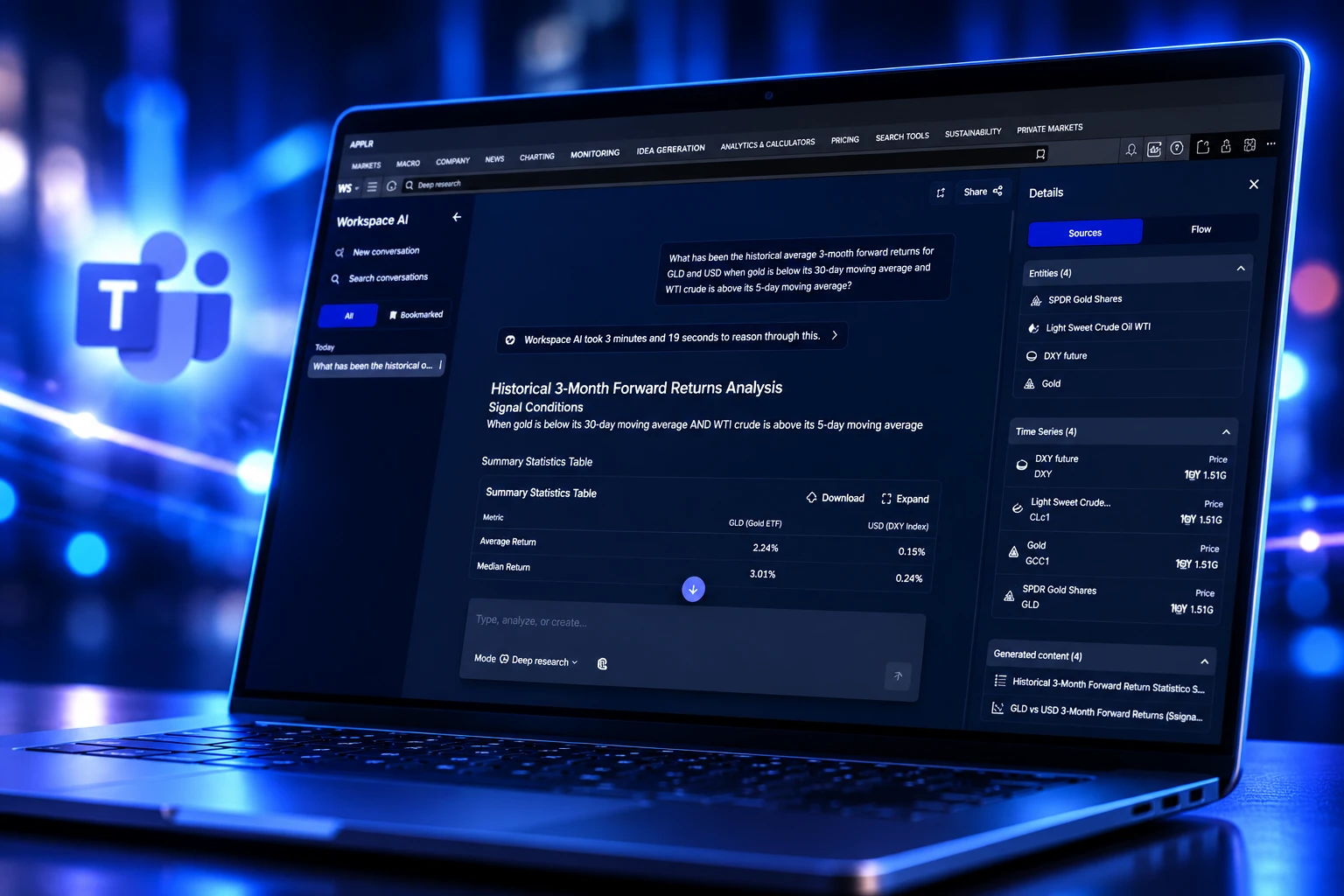
LSEG’s Company Intelligence agent now builds shareable company files in Workspace, a grandchild of Teams meeting prep that is still queued for Microsoft Teams.

LSEG has launched Company Intelligence, an AI agent in LSEG Workspace that builds a structured company overview in seconds from licensed data. The tool is live in Workspace as of July 2026, and LSEG still lists Microsoft Teams as coming soon.
On its H1 2026 earnings call, LSEG called the agent the grandchild of Meeting Prep, the first prototype from its Microsoft partnership, and said users were already pulling about 3,000 detailed company reports a week.
Company Intelligence Is Live in Workspace
The purpose-built AI agent in Workspace sits on the search bar. Type a company name and it returns a pre-built file instead of a pile of separate apps for earnings, news, ownership and deals. LSEG pitched it for days when coverage is thin: a relationship manager walking into a client meeting, an analyst covering a name outside the usual book, an investment team that needs a briefing everyone can share.
Users can reshape that file by hand or with plain-language prompts, and those choices stick for the next company they open. The finished note exports to PDF or Word. The tables underneath export to Excel. In a June 24, 2026 demo, LSEG’s head of AI product for Workspace said the agent was live with several thousand users, with Microsoft product availability coming very soon. Public and private companies both work.
Company Intelligence helps financial professionals build a trusted view of a company faster. By combining AI, licensed content, proprietary LSEG data and exclusive sources, it delivers accurate and auditable insights directly into Workspace, and soon into Microsoft Teams, helping teams move more quickly from research to decision-making
Nej D’Jelal, Group Head of Workflows, LSEG
That “soon” is doing a lot of work. The July product note still treats Teams as a follow-on, even though LSEG has been building company files inside Teams for more than a year under another name.
The Agent Began as a Teams Meeting-Prep Tool
Meeting Prep was the first prototype out of the LSEG-Microsoft partnership. Microsoft Cloud promoted a Financial Meeting Prep app for Teams on January 29, 2025, powered by Microsoft Cloud for Financial Services and LSEG data. The pitch then was the same pitch now: stop spending hours assembling a company pack before a call.
LSEG later moved that idea into Workspace, dressed it as an agent, and kept the Teams destination on the roadmap. The third AI agent for Workspace is the one that still has to finish the trip back into chat.
THE MEETING-PREP PATH TO WORKSPACE
- January 29, 2025: Microsoft Cloud promotes Financial Meeting Prep for Teams, built on LSEG data.
- October 25, 2025: LSEG Workspace for Teams leaves beta and ships as a released app.
- February 14, 2026: Workspace for Teams 1.20 hits general release, including Open Directory fixes.
- April 23, 2026: LSEG says Workspace AI Deep Research is available through Microsoft Teams as well as the main platform.
- June 24, 2026: An LSEG product demo says Company Intelligence is live with several thousand users, with Microsoft products coming very soon.
- July 2026: LSEG publishes the Company Intelligence launch note for Workspace and again flags Teams as coming soon.
By the H1 2026 call at the end of July, LSEG was already counting about 3,000 detailed company reports a week from multiple underlying sources. The grandchild had users. It still did not have a Teams date.
What Lands in a Company Intelligence Report
Company Intelligence reports combine price performance, key financials, peer comparisons, analyst research, deals, events and ownership, plus AI summaries of Reuters News and company transcripts, with citations back to the source documents. The point of the file is that those pieces arrive together, already laid out the way LSEG’s own financial frameworks compare companies.
WHAT EACH REPORT PULLS IN
| Section | What the file includes |
|---|---|
| Market tape | Price performance for the name you searched |
| Company accounts | Key financials drawn from LSEG’s licensed sets |
| Peer set | Comparisons built on LSEG’s own frameworks |
| Street view | Analyst research, including price targets if you ask for them |
| Deal and event log | Deals, events and ownership |
| Text layer | AI summaries of Reuters News and company transcripts, each claim tied to a citation |
In the June demo, the companion on the left of the report takes a prompt such as moving analyst price targets to the top of the file and rewrites the layout. A follow-up question about what is driving the price returns a sourced answer beside the same document. Earnings summaries show revenue impact and whether EPS beat or missed, with a toggle into the full transcript for keyword search or download. News claims are not orphaned paragraphs; each one links through to the underlying story.
Drag-and-drop section order persists across the next names you run, which is how a coverage team ends up sending files that look like they came from the same desk. Share stays inside Workspace for another licensed user, or leaves as PDF, Word or Excel when the audience is a client.
The Briefing Leaves the Terminal Before the Call
The people LSEG named first are not the traders glued to the tape. They are relationship managers and bankers who need a fact-based pack before a client meeting, analysts who have to get current on a name outside core coverage, and investment teams that want one briefing they can pass around. Those jobs already live in calendar invites and Teams chats. They do not live in a specialised quote window.
That is the second move hiding under the launch note. A Workspace seat still holds the entitlements, the Reuters feed and the transcript archive. The output is a file someone can drop into the thread where the meeting was booked. LSEG spent 2025 moving about 350,000 users off Eikon onto Workspace, then spent the Microsoft partnership putting Workspace next to Excel, PowerPoint and Teams. Company Intelligence is the piece that turns that adjacency into a client-ready document.
The risk for LSEG is the same as the upside. If the file is good enough, the meeting prep never opens the full desktop. If the file is thin, the people who needed it most go back to assembling slides by hand, and the agent stays a curiosity for users who already know where every data item sits.
The Teams App Already Writes Company Reports
LSEG Workspace in Teams is not a rumour. The LSEG Workspace app for Microsoft Teams is listed in Microsoft’s 365 certification catalogue as app WA200008886, last updated by LSEG on June 16, 2026, with AI listed as part of its core features and a claimed reach of 350,000+ financial professionals. It signs in with Microsoft Entra. Hosting sits on Azure and AWS. Profile and search data for the directory is stored in Ireland.
The user guide already has a chapter titled Creating company reports in Teams. From the Home tab, a user hits Choose company. From Chat, they type a request for any private or public company and open View Report. Reuters Top News is a separate prompt in the same rail. That workflow is Meeting Prep’s surviving shape: a company pack summoned from the place the call is about to start.
HOW A TEAMS USER STARTS A COMPANY FILE
- Home tab: Open LSEG Workspace in Teams, then Choose company from the top of Home.
- Chat tab: Type a request for a public or private company and select View Report.
- Native search: Run /LSEG Workspace, pick Data Search, then share the result into a Teams chat.
- Pin: After install from Apps, pin the LSEG Workspace icon on the left rail so the next briefing is one click, not a hunt through the store.
Company Intelligence, the branded agent from the July note, is still the missing piece in that list. LSEG has not published a Teams date for it. The Workspace Teams app can already draft a company report; the new agent is what LSEG wants that report to become once the same models, citations and saved layouts catch up.
WHAT WE KNOW
- Workspace status: Company Intelligence is live in LSEG Workspace as of July 2026.
- Teams app: LSEG Workspace for Teams is a released, certified Microsoft 365 app, with company-report prompts already in the user guide.
- Weekly use: LSEG told investors on the H1 2026 call that users were pulling about 3,000 detailed company reports a week.
WHAT IS UNCONFIRMED
- Teams date: LSEG has not named a day when the Company Intelligence agent itself appears inside Workspace in Microsoft Teams.
- Feature parity: It is not public whether the Teams version will keep PDF, Word and Excel export, saved layouts, or the companion prompts shown in the Workspace demo.
Until that date lands, a banker can still build a company pack in Teams. They just cannot yet call it Company Intelligence.
Search and Deep Research Got the Microsoft Door Open
Company Intelligence did not walk into an empty AI shelf. Workspace already had two other tools on the same platform, and one of them was already in Teams before the July note. LSEG’s April 23, 2026 trading update said Deep Research already runs in Microsoft Teams, after a Q1 pilot of around 1,600 users. Search reached general availability across Workspace in July.
THE THREE WORKSPACE AI TOOLS
| Tool | Job | Where it stood by late July 2026 |
|---|---|---|
| AI Search | Natural-language lookup across Workspace content | Generally available in July 2026, with 17,000 active users on the H1 call |
| Deep Research | Longer, model-backed answers on LSEG data | In Teams as of April 23, 2026; LSEG said users quadrupled from Q1 |
| Company Intelligence | A structured, shareable company file | Live in Workspace; Teams still listed as coming soon; about 3,000 reports a week |
Search finds. Deep Research argues at length. Company Intelligence formats. The third job is the one that matches a client meeting, because the output is a document rather than a chat transcript. That is why LSEG keeps pointing it at Teams even after the other two tools have already crossed over. A long Deep Research answer is useful in a research huddle. A branded company file is what gets forwarded to a coverage team that never logged into Workspace that morning.
Word, PDF and Excel Take the File Offline
The export list is the tell. PDF and Word are for the people who will not open Workspace. Excel is for the analyst who wants the tables, not the prose. Once those three doors exist, the agent’s job is finished when the file leaves, not when the user keeps clicking inside LSEG’s shell. LSEG’s own demo walks that path in about three and a half minutes: search a name, read the earnings summary, ask the companion to restack the sections, share or export.
https://www.youtube.com/watch?v=ePso2TC1syk
WHERE THE FILE GOES NEXT
- PDF or Word: A client-ready overview that no longer needs a Workspace login to read.
- Excel: Underlying financials and tables for anyone who will model rather than brief.
- Workspace share: A copy to another entitled user, layouts included.
- Teams, when it ships: The same file beside the chat and calendar item the meeting already occupies.
LSEG still has not dated that last step. The July note, the June demo and the H1 remarks all leave Microsoft Teams as the next room, not a room with a number on the door. Until it opens, Company Intelligence is a Workspace agent with a Teams family history, and the people who book the meeting are still one product note away from generating the file without leaving the chat.

Windows 11 26H2 Turns Settings Backup On by Default

The Gears 2 PC Port Epic Refused to Ship

Ghost Recon Wildlands Returns at 4K as a Catalog Product

Waterpark Simulator Keeps the $12.99 Price After 1.0

Nurix Puts NuPlay on Microsoft Marketplace to Reach Azure Buyers

Warzone Leaves Xbox One and PS4 After Season 06

Microsoft AI Was Set Free to Build Its Own Frontier

Microsoft IQ Turns Workplace Data Into a Metered Agent Brain

Xbox Games Showcase 2026 Split the Catalog in Two

Nadella Banned Addiction Talk While Scout Kept Heartbeat
-
 NEWS5 months ago
Warzone Leaves Xbox One and PS4 After Season 06
-
 NEWS5 months ago
Microsoft AI Was Set Free to Build Its Own Frontier
-
 MICROSOFT 3655 months ago
Microsoft IQ Turns Workplace Data Into a Metered Agent Brain
-
 NEWS5 months ago
Xbox Games Showcase 2026 Split the Catalog in Two
-
 MICROSOFT 3655 months ago
Nadella Banned Addiction Talk While Scout Kept Heartbeat
-

 NEWS5 months ago
Modern Warfare 4 Splits Its Audience Before the October Launch
-

 NEWS5 months ago
Infinity Ward Bets Modern Warfare 4 on a Paid DMZ
-

 NEWS5 months ago
Dragonwilds Hits Xbox, but Steam Saves Stay Put