
AZURE
Azure Postgres Opens the Upgrade Dry Run to Everyone
Azure Database for PostgreSQL now offers a generally available dry run that wraps pg_upgrade –check and Azure gates before any major version jump.

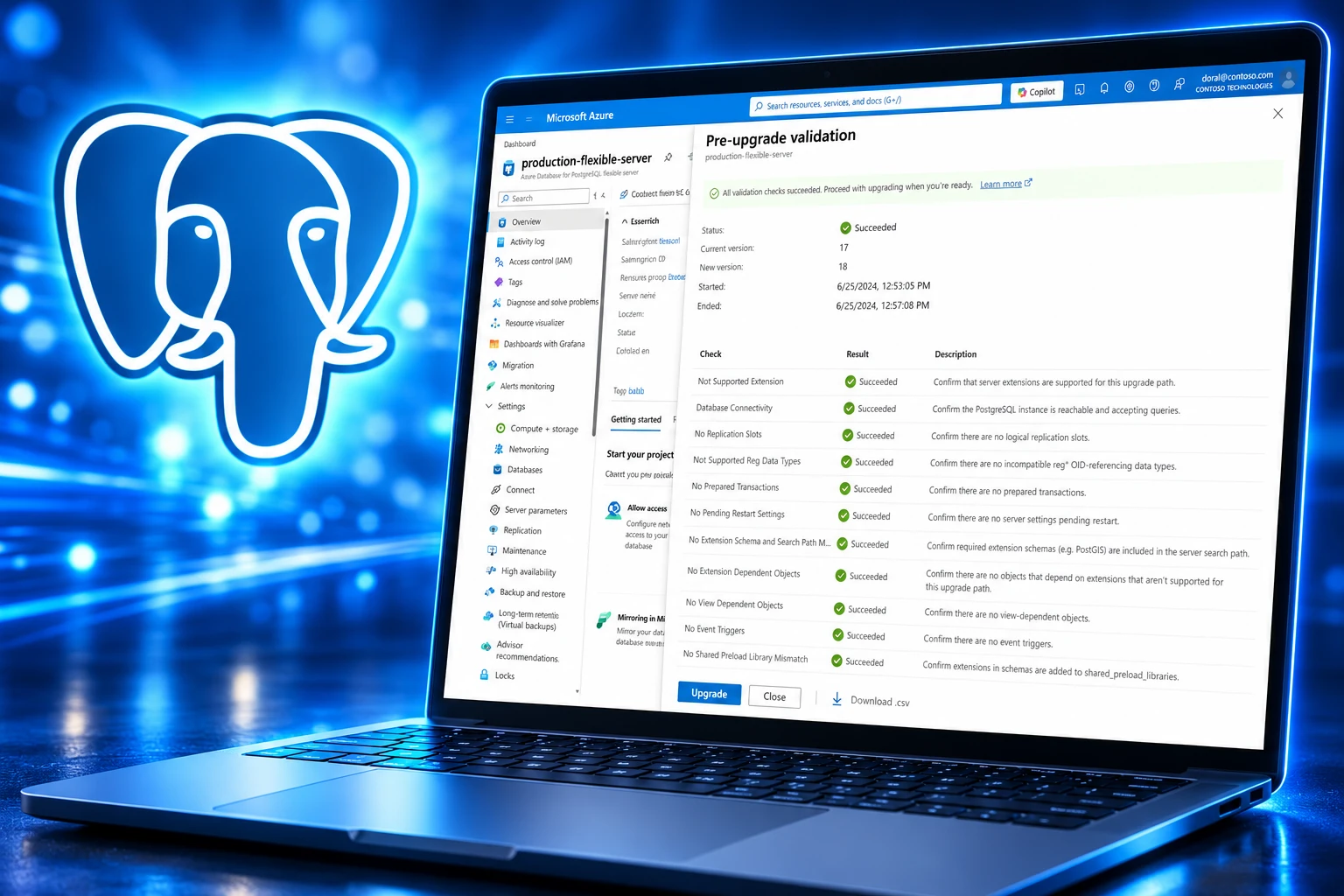
Azure Database for PostgreSQL flexible server now treats pre-upgrade validation checks as generally available, Microsoft listed in its August 2026 release notes. The portal and Azure CLI can run the same gates that already stopped live upgrade clicks, without changing the engine version or taking the server down.
The feature is a dry run. It is the check catalog Flexible Server already ran inside the upgrade, split off so a DBA can fix blockers on a weekday and only then book the outage.
August Made the Pre-Upgrade Checks Generally Available
Microsoft first put Pre-Upgrade Validation Checks into public preview in the June 2026 Flexible Server notes, the same month the company published the product blog. That post went up on 8 June 2026. An August 2026 update on the same page, last published on 11 August 2026, said the checks were generally available in the portal and the CLI.
The August notes also listed new minor versions 18.6, 17.11, 16.15, 15.19, and 14.24. The validation how-to on Microsoft Learn was last updated on 7 August 2026, just before that GA line landed.
THE PREVIEW-TO-GA CALENDAR
- 8 June 2026: Microsoft publishes the Flexible Server blog that introduces Pre-Upgrade Validation Checks in public preview.
- June 2026: The Azure Database for PostgreSQL flexible server release notes list the checks as a preview item.
- 7 August 2026: The Learn how-to for running the checks is updated, including Azure CLI 2.89.0 or later with –validate-only.
- 11 August 2026: The same blog is updated to say the checks are generally available in the portal and the CLI.
- August 2026: The monthly release notes move pre-upgrade validation checks from preview into general availability.
Microsoft’s own write-up is blunt about the loop it is trying to break. Flexible Server already ran upgrade prechecks, took an implicit backup when those checks passed, and then used PostgreSQL pg_upgrade. Teams still found the blockers after they had entered the change window. The new action is meant to turn that into Validate, Fix, Re-Validate, then Upgrade.
Postgres Already Had the Dry Run
Self-hosted operators have had this step for as long as they have used pg_upgrade. The current PostgreSQL documentation still ships a pg_upgrade check clusters only option (–check, or -c) that inspects old and new clusters and does not change any data. The old server can stay up while that check runs. Community guides treat a clean “Clusters are compatible” report as the gate that has to pass days before the maintenance window, not during it.
Azure’s in-place path is the same tool underneath. Microsoft says Flexible Server uses pg_upgrade, keeps the server name and connection settings, and can skip major versions rather than stepping through each one. The community still ships a new major about once a year. Flexible Server currently offers in-place targets across PostgreSQL 18, 17, 16, 15, 14, 13, 12, and 11, and only to versions Azure still supports.
Amazon RDS for PostgreSQL has long run its own precheck during a major version upgrade and written failures into a precheck log, with PostGIS a frequent reason the job dies. Azure’s news is not that prechecks exist. It is that they can now run as their own operation, with a CSV you can hand to another team, before anyone clicks Upgrade.
This shifts upgrade troubleshooting from the upgrade window to a proactive pre-flight step.
Microsoft, Azure Database for PostgreSQL blog, updated August 2026
A managed service that asks you to prove the jump will not fail before you start is also an admission. The first time many Azure Postgres teams learned they still had HypoPG, a replica, or a bad PostGIS search_path was the upgrade click itself.
What Azure Checks Before a Major Version Jump
Upgrade Validation Checks (the Learn title for the same feature) look at Azure platform rules and PostgreSQL compatibility, including pg_upgrade –check. They do not upgrade the server, restart it, or change the major version. Microsoft says the same checks still run automatically if you go straight into the upgrade workflow.
The blog groups the pass into four buckets: platform readiness, extension compatibility, database objects, and the engine check. Learn’s major version upgrade limitations on Flexible Server add unsupported extensions, logical replication slots, prepared transactions, event triggers, object dependencies, and pending restart-required settings as common hits.
WHAT THE DRY RUN COVERS
| Check group | What Microsoft says it inspects |
|---|---|
| Platform | Server state, target version support, storage headroom, upgrade readiness |
| Extensions | Unsupported or version-sensitive extensions |
| Objects and topology | Read replicas, logical replication slots, event triggers, PostGIS search_path, other upgrade-sensitive objects |
| Engine | PostgreSQL pg_upgrade –check |
Two outcomes come back: no blocking issues, or one or more issues that must be fixed before the upgrade can proceed. Failed checks include descriptions and remediation text. You can download a CSV with the check name, result, error details, and recommended fixes, then rerun until the report is clean.
Microsoft warns that the published limitation lists are a general reference and can lag the live policy for a given source and target. The authoritative set is whatever the validation pass returns for that server, including current logical replication slot rules. That is the point of splitting the dry run out of the upgrade click.
TimescaleDB, PostGIS, and Replica Topology Still Block
The work did not disappear. It moved earlier, onto the people who own extensions, GIS objects, and replicas. Validation will not drop those objects for you. It will tell you they are in the way.
On 20 January 2026, Microsoft’s Azure database support team described a Flexible Server jump from PostgreSQL 11 to 17 that died in precheck because HypoPG blocked an 11 to 17 upgrade. The extension was installed in 4 databases. HypoPG is on the current drop-and-recreate list for every upgrade path, next to pg_repack and pg_partman. Support had to turn the extension back on in azure.extensions before DROP EXTENSION would even run.
EXTENSIONS THAT BLOCK EVERY PATH
- Always remove first: session_variable, anon, and age block in-place major version upgrades on all paths and can be re-enabled later if the target supports them.
- Drop and rebuild: pg_repack, hypopg, and pg_partman are non-persistent utilities; drop them before the upgrade and create them again after.
- DROP is enough: Microsoft says you must run DROP EXTENSION for unsupported extensions and you do not have to take them off the allow list.
- Path-specific hits: pg_hint_plan, semver, azure_local_ai, pg_failover_slots, azure_ai, azure_storage, pg_diskann, pgrouting, and orafce only block some source or target versions, which is why a live validation pass beats a wiki list.
PostGIS is a settings problem as much as an extension problem. If you use PostGIS or the dependent stack (postgis_raster, postgis_sfcgal, postgis_tiger_geocoder, postgis_topology, address_standardizer, address_standardizer_data_us, fuzzystrmatch), search_path has to include those names. Miss that and the upgrade can fail or leave broken objects behind.
TimescaleDB is narrower still. In-place major version upgrades are supported only on listed source and target pairs. Any other path is blocked unless you drop TimescaleDB or move with a side-by-side method such as logical replication.
TIMESCALEDB IN-PLACE PATHS AZURE DOCUMENTS
| Source PostgreSQL | Supported in-place targets |
|---|---|
| 11 | 12 |
| 12 | 13, 14, 15 |
| 13 | 14, 15, 16 |
| 14 | 15, 16 |
| 15 | 16, 17, 18 |
| 16 | 17, 18 |
| 17 | 18 |
Topology is its own ticket. Geo-replication and read replicas, including cascading replicas, are not supported during in-place upgrades. You delete the replica, upgrade the primary, then recreate it. Event triggers are blocked because they hook DDL and can touch system catalogs that change between majors; drop them and put them back after. Views that depend on pg_stat_activity are not supported. Jumps off PostgreSQL 11 also require SCRAM authentication and a reset of authentication-role passwords before the in-place path will proceed.
The Portal Path and the CLI Flag
Microsoft’s how-to says you run upgrade validation checks in the portal from the existing Upgrade blade. The server has to be Ready or the Upgrade button stays disabled. You pick the target major version, set Action to Validate only, and start the job. Keep the status pane open. If the report is clean you can download the CSV or go on to Upgrade. If it is not, you fix the listed errors and run the pass again.
The CLI path needs Azure CLI 2.89.0 or later:
az postgres flexible-server upgrade \
 --resource-group <resource_group> \
 --name <server> \
 --version <target_version> \
 --validate-only
That command prints the pre-upgrade results and leaves the server on its current major. Microsoft also lists operational limits on the dry run itself: it is not supported on read replicas, it cannot run while another server operation is in progress, and it has to reach every database. An unresponsive database can fail the pass. The checks are not an outage, but Learn still tells you to run them when activity is lower.
In-Place Upgrade Still Needs an Outage Window
A green validation report is permission to schedule the jump, not a promise that users will stay connected. Once you start the real in-place upgrade, Flexible Server runs the precheck again. If that pass succeeds, the service stops the server and takes an implicit backup it can use if the engine upgrade fails. There is no automated way back to the old major after a success. Point-in-time recovery to a time before the upgrade restores the previous version on a new server.
BEFORE YOU BOOK THE WINDOW
- Storage headroom: Keep at least 10-20% free space; temporary logs and metadata can fill the disk and fail or complicate a rollback.
- High availability: On an HA server the service disables HA, upgrades the primary, then turns HA back on, which needs spare capacity for a new standby.
- Network path: The server must send and receive on ports 5432 and 6432 inside its virtual network and to Azure Storage; tight NSG rules can leave HA off after the upgrade.
- Duration: Time tracks object count, large objects, extensions, and long transactions that delay shutdown, not just data size.
Most extensions upgrade themselves during the in-place job, with the exceptions in the limitation lists. The process also lands the latest supported minor of the target major. Long-running work right before the click makes the shutdown slower. After the upgrade, the first user created on the server, the one granted ADMIN, has administrative privileges over other roles for maintenance.
That is not new. What August 2026 changed is that the argument with HypoPG, PostGIS, TimescaleDB, and replica owners can happen while the old major is still serving traffic. The outage window is still an outage window. It no longer has to be the first time you find out the server was never ready.
Frequently Asked Questions
Do You Have to Remove Blocked Extensions From the Allow List?
No. Microsoft’s major version upgrade document says you must run DROP EXTENSION to take unsupported extensions off the server before an in-place upgrade, and you do not need to remove those extensions from the azure.extensions allow list. In the January 2026 HypoPG case, support had to add hypopg back to azure.extensions first because a prior disable at the portal had blocked the DROP.
How Do You Download the pg_upgrade Validation Logs?
The CSV from the validation pane is the summary. Detailed pg_upgrade log files sit on the Server logs page under Monitoring, and you can download them only if server logs are already enabled on that Flexible Server. Microsoft’s how-to points at those files for the full validation output when the pane is not enough.
Can Validation Run If a Database Is Unresponsive?
The pass needs connectivity to every database on the server, and Microsoft says an unresponsive or inaccessible database can fail validation even when the rest of the instance looks healthy. The checks still do not take the server down or restart it, but Learn recommends running them when database activity is lower so the job can actually finish.
Can You Run Validation Checks on a Read Replica?
No. Upgrade Validation Checks are not supported on read replicas, and a replica also cannot sit in place during the later in-place upgrade of its primary. Microsoft’s documented sequence is to delete the read replica (including any cascading replica), validate and upgrade the primary, then recreate the replica after the new major is up.

Windows 11 26H2 Turns Settings Backup On by Default

The Gears 2 PC Port Epic Refused to Ship

Ghost Recon Wildlands Returns at 4K as a Catalog Product

Waterpark Simulator Keeps the $12.99 Price After 1.0

Nurix Puts NuPlay on Microsoft Marketplace to Reach Azure Buyers

Warzone Leaves Xbox One and PS4 After Season 06

Microsoft AI Was Set Free to Build Its Own Frontier

Microsoft IQ Turns Workplace Data Into a Metered Agent Brain

Xbox Games Showcase 2026 Split the Catalog in Two

Nadella Banned Addiction Talk While Scout Kept Heartbeat
-
 NEWS5 months ago
Warzone Leaves Xbox One and PS4 After Season 06
-
 NEWS5 months ago
Microsoft AI Was Set Free to Build Its Own Frontier
-
 MICROSOFT 3655 months ago
Microsoft IQ Turns Workplace Data Into a Metered Agent Brain
-
 NEWS5 months ago
Xbox Games Showcase 2026 Split the Catalog in Two
-
 MICROSOFT 3655 months ago
Nadella Banned Addiction Talk While Scout Kept Heartbeat
-

 NEWS5 months ago
Modern Warfare 4 Splits Its Audience Before the October Launch
-

 NEWS5 months ago
Infinity Ward Bets Modern Warfare 4 on a Paid DMZ
-

 NEWS5 months ago
Dragonwilds Hits Xbox, but Steam Saves Stay Put